Before you start
Sign in to keep the flashcards in your account. Use material you have permission to use. Automatic generation uses your available allowance; check the status and any access requirements shown in the app.
Due review is for previously studied cards whose next review time has arrived. A new-card learning plan is a separate workflow.
1. Find the right place
On Home, use “Start reviewing” in the due-review panel. It starts the due candidates shown for that session across all sets, including sets beyond the short preview list.
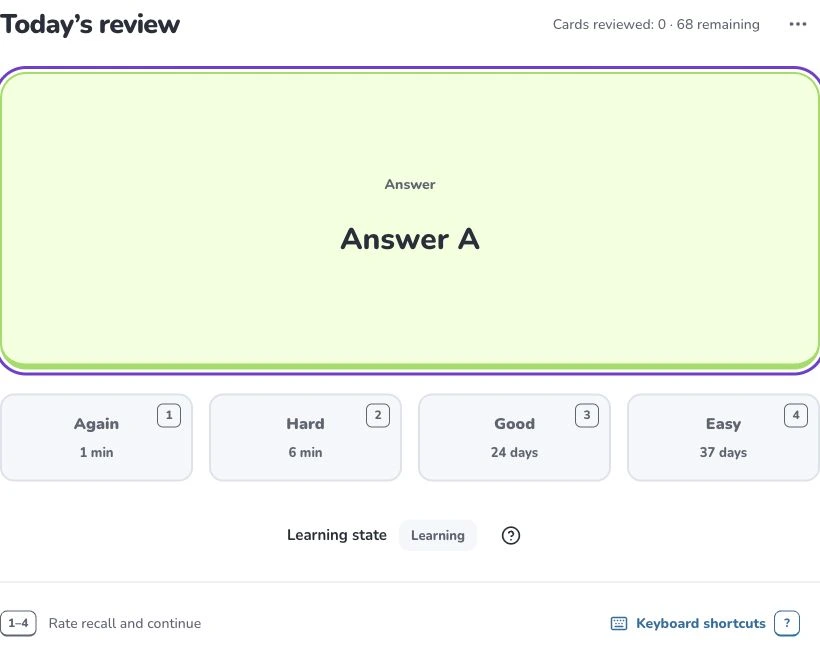
- 1
- Today’s review
- 2
- Rate your recall
- 3
- Learning state
2. Prepare and choose
Read each question and try to recall before revealing the answer. Home’s review action does not automatically add unstudied cards. The session’s candidate set is fixed when you start; cards becoming due later belong to a later session.
3. Check the settings
Recall before revealing the answer. Choose “Again” if you could not recall it, “Hard” if recall was difficult, “Good” for correct recall, or “Easy” for effortless recall. Use your actual recall, not the interval you would prefer. The displayed next interval depends on that card’s history.
4. Check the result
Rate your recall once and continue until the session completes. FSRS schedules future reviews from your ratings and history. The learning-state label is a summary of a card’s state, not another rating you need to choose.
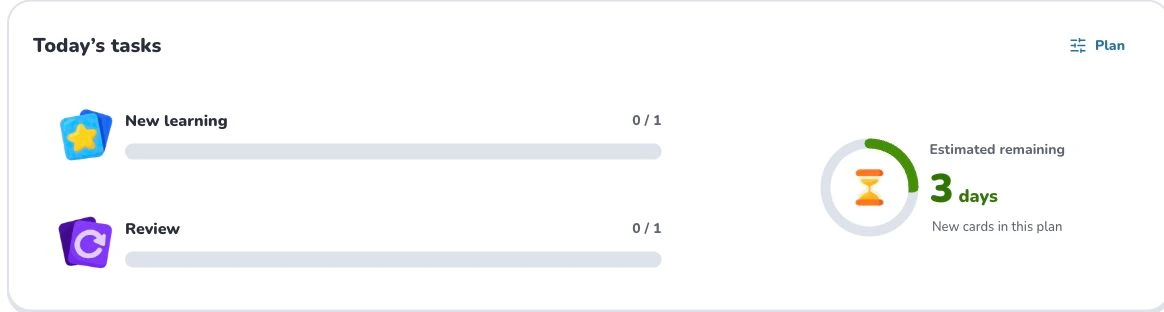
- 1
- Plan
- 2
- New learning
- 3
- Review
- 4
- New cards in this plan
Troubleshooting
If the due count differs after some time, check whether you reviewed elsewhere or more cards became due. Starting a set’s learning plan can include planned new cards; use Home’s due-review entry when you want due cards only.
What to learn next
Continue with these related Help Deckumi guides. Each uses the same web app and explains a different part of the workflow.