Before you start
Sign in to keep the flashcards in your account. Use material you have permission to use. Automatic generation uses your available allowance; check the status and any access requirements shown in the app.
Open a saved set containing new cards. A plan distributes new learning; it does not postpone cards that are already due for review.
1. Find the right place
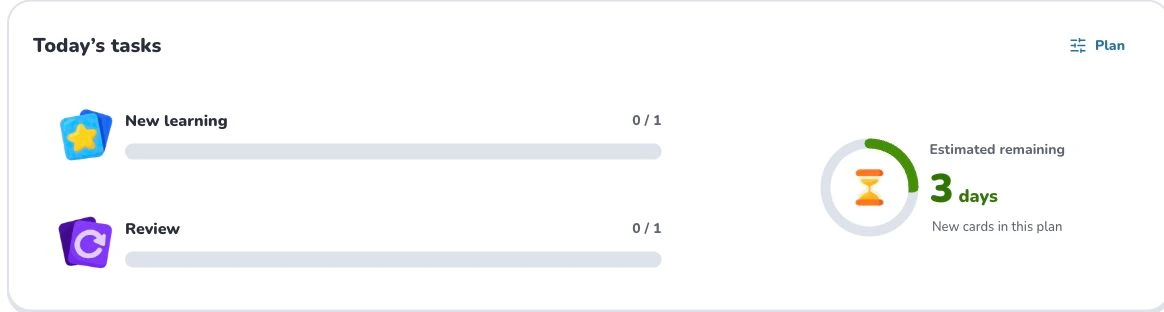
Open the set and find its learning-plan area. Create a plan when invited, or choose “Plan” to adjust an existing one.
- 1
- Plan
- 2
- New learning
- 3
- Review
- 4
- New cards in this plan
2. Prepare and choose
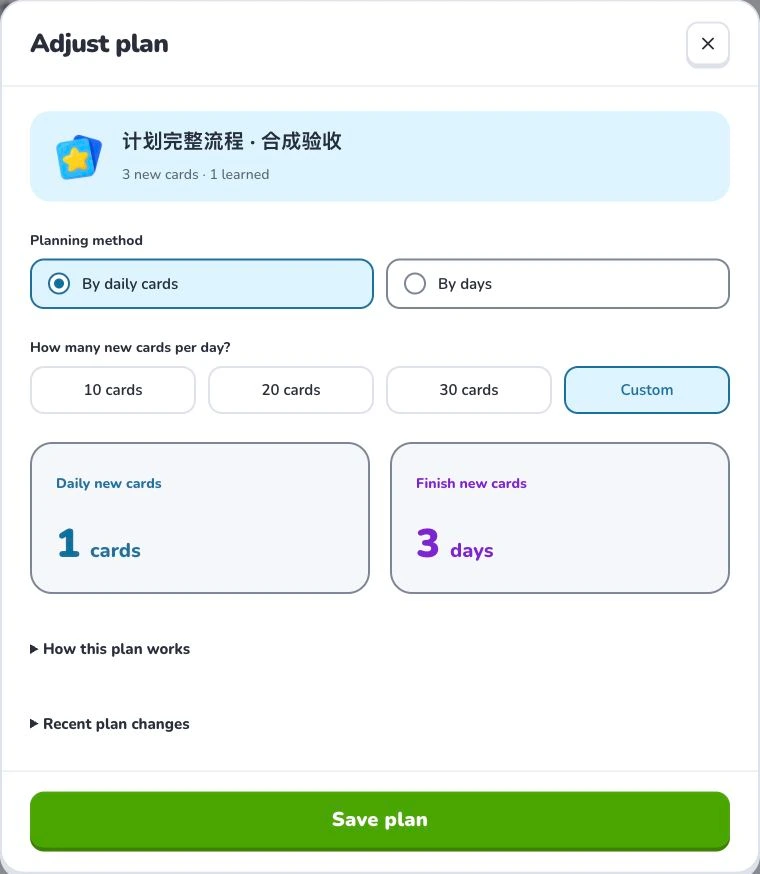
Choose a daily count or a number of days. Check the calculated new cards per day and estimated remaining days. Start with a sustainable amount; finishing new cards does not remove the need for later spaced reviews.
- 1
- Planning method
- 2
- Estimated remaining
- 3
- Save plan
3. Check the settings
Choose a daily card count or a target duration. Check the daily new-card amount and estimated completion time before saving. Adjusting the pace preserves work already completed today. Newly added or changed cards require your confirmation before joining an existing plan.
4. Check the result
Today’s tasks shows new learning and review separately. Open a task for its details and continue from that task. When new or changed cards are offered for an existing plan, review the change and explicitly confirm their inclusion.
Troubleshooting
Missing a day leaves unlearned cards for later; it does not mean the data disappeared. If an estimate changes, check remaining new cards, your chosen pace and confirmed additions. Already completed work today is preserved when adjusting pace.
What to learn next
Continue with these related Help Deckumi guides. Each uses the same web app and explains a different part of the workflow.